Operational Transforms: Algorithms that Resolve Conflicts in Real-Time Docs 📝
Operational Transforms (OT) power collaborative editing by employing sophisticated algorithms to resolve conflicts in shared documents. In this post, we dive deep into these algorithms, demonstrate practical examples in React, and share real-world use cases—all from a middle developer's perspective.
1. Introduction: Real-Time Collaboration and Conflict Resolution
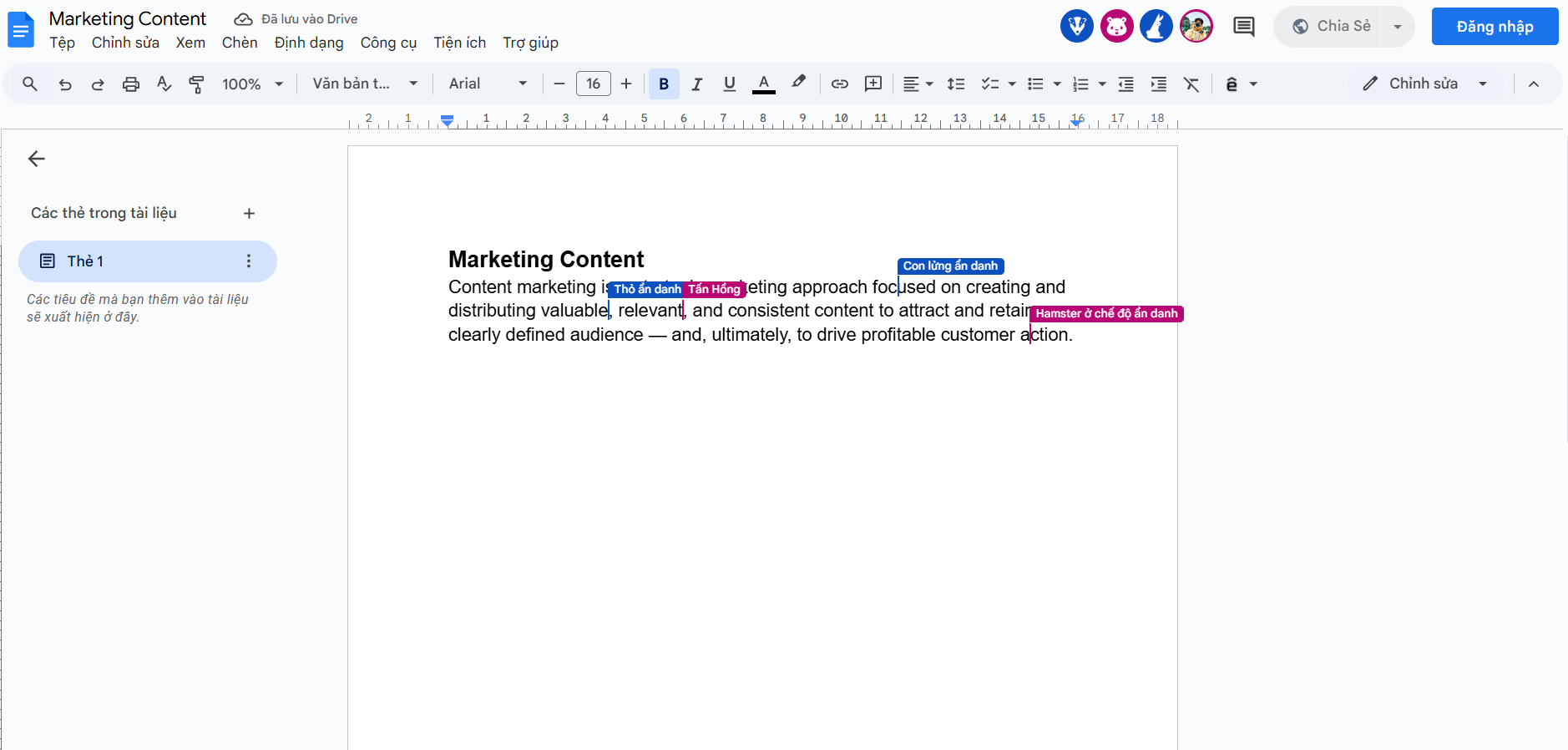
Ever worked on a Google Doc with friends or teammates? Everyone’s typing, deleting, or editing at the same time-yet somehow, the document stays intact.
The secret behind this magic lies in the algorithms that detect and resolve conflicts in real time, ensuring that all edits-no matter how simultaneous or chaotic-are merged into one clean, coherent document.
A Clearer Example: Why Conflict Happens
Let’s imagine a shared document with this content:
Now, at the same time, two users make changes:
Step 1: User A: Inserts real-time at position 13 (before "editing"):
Step 2: Apply User B’s deletion (still targeting position 13):
🛑 Problem: User B accidentally deletes part of User A’s insertion. The content is corrupted because the position wasn’t adjusted!
But thanks to conflict resolution algorithms-specifically, Operational Transforms (OT)-these changes are intelligently transformed relative to one another.
2. What Are Operational Transforms (OT)?
Operational Transforms (OT) are a class of algorithms that allow multiple users to collaboratively edit a shared document in real time-without stepping on each other’s toes. OT ensures that even when multiple users make changes at the same time, everyone ends up with the same, consistent result.
🔧 How Does OT Work?
At its core, OT works by capturing each user's operation (like insert or delete), and if two operations conflict (e.g. both touch the same position), OT intelligently transforms them against each other so that both can be applied without breaking the document. Version numbers let us detect concurrent operations. OT transforms these edits so they apply cleanly — keeping documents consistent across all users.
- • Operations: OT tracks actions like insert, delete, or replace with positions and content.
- • Transformation: When two operations happen at once, they are "transformed" relative to one another so they can be applied in any order.
- • Consistency: All clients see the same final document state, no matter the order of incoming operations.
Step 1: Represent Edits as Operations:
Every change a user makes is captured as an operation. For example, if someone inserts "Hello" at position 5 in a document, we represent that as:
{
  "version": 0.1,
  "type": "insert",
  "position": 5,
  "text": "Hello",
}
Or, if they delete one character at position 3:
{
  "version": 0.1,
  "type": "delete",
  "position": 3,
  "length": 1,
}
OT works with these operation objects.
Step 2: The Problem – Concurrent Edits:
Imagine the document is currently at version 0.1 on the server.
Two users make edits at the same time (while both think they're on version 0.1):
- User A inserts "Hi " at position 0
- User B inserts "!" at position 4
If you apply A then B:
User A: "Hi Cool story"
User B: inserts "!" at position 4 → "Hi C!ool story"
If you apply B then A:
User B: "Cool! story"
User A: inserts "Hi " at 0 → "Hi Cool! story"
❗️Result: Two users see different documents. That's the core problem OT solves.
Step 3: Transformation to the Rescue:
When the server receives both operations with version: 0.1, it detects that they are concurrent.
Now it uses a transformation function:
transform(op1, op2): [op1', op2']
This function takes two concurrent operations and adjusts their positions so that they can both be applied safely, no matter the order. In our case:
- opA: Insert "Hi " at 0
- opB: Insert "!" at 4
{
  "version": 0.2, // after applying opA, the doc is now version 6
  "type": "insert",
  "position": 7,
  "text": "!"
}
Now apply:
- A: "Hi Cool story"
- B': "Hi Coo!l story"
Transformation Rules (Simplified)
- • Two inserts at the same position → one is moved right
- • Delete before insert → insert shifts left
- • Insert before delete → delete shifts right
- • Overlapping deletes → adjust range
4. Integrating OT with React: A Practical Example
React’s component-based architecture and state management make it ideal for implementing OT-based real-time editing. Below is an example of a collaborative text editor component in React: We define an Operation type that captures each user's intent (insert/delete), position, version, and user ID.
🧱 1. Data Structure: Operation:
type Operation = {
  type: "insert" | "delete";
  position: number;
  text?: string;
  length?: number;
  version: number;
  user: string;
};
📌 Example Insert Operation:
{
  "type": "insert",
  "position": 0,
  "text": "Hi ",
  "version": 0,
  "user": "UserA"
}
🔄 2. The transform() Function
This function handles position adjustment when two concurrent operations conflict.
function transform(opA: Operation, opB: Operation): Operation {
 // Insert vs Insert
 if (opA.type === "insert" && opB.type === "insert") {
   if (opA.position <= opB.position) {
     return { ...opB, position: opB.position + opA.text!.length };
   }
 }

 // Insert before delete
 if (opA.type === "insert" && opB.type === "delete") {
   if (opA.position <= opB.position) {
     return { ...opB, position: opB.position + opA.text!.length };
   }
 }

 // Delete before insert
 if (opA.type === "delete" && opB.type === "insert") {
   if (opA.position < opB.position) {
     return { ...opB, position: opB.position - opA.length! };
   }
 }

 return opB;
}
🔁 Example Transformation
| Operation A | Operation B | Transformed B |
|---|---|---|
| Insert "Hi " at pos 0 | Insert "!" at pos 4 | Insert "!" at pos 7 |
✍️ 3. applyOperation(): Modify the Document
This function applies an operation to the document string.
function applyOperation(op: Operation, doc: string): string {
  if (op.type === "insert") {
    return doc.slice(0, op.position) + op.text + doc.slice(op.position);
  } else if (op.type === "delete") {
    return doc.slice(0, op.position) + doc.slice(op.position + op.length!);
  }
  return doc;
}
🧪 Example Insert Before: "Cool story" Insert "Hi " at 0 → "Hi Cool story"
🧪 Example Delete Before: "Hi Cool story" Delete 1 char at 5 → "Hi Col story"
🚀 4. The sendOperation() Function
This function:
- • Transforms new operations against previous ones
- • Applies to shared state
- • Increments server version
function sendOperation(op: Operation) {
  for (let pending of pendingOps) {
    if (pending.version === op.version) {
      op = transform(pending, op);
    }
  }

  sharedDoc = applyOperation(op, sharedDoc);
  serverVersion++;
  op.version = serverVersion;
  pendingOps.push(op);
  setDoc(sharedDoc);
}
🔘 5. Insert/Delete Action Handlers
These create operation objects and send them.
function handleInsert(user: string, text: string, position: number) {
  const op: Operation = {
    type: "insert",
    text,
    position,
    version: localVersion.current,
    user,
  };
  sendOperation(op);
}

function handleDelete(user: string, position: number, length: number) {
  const op: Operation = {
    type: "delete",
    position,
    length,
    version: localVersion.current,
    user,
  };
  sendOperation(op);
}
🧩 6. UI Buttons and Output
The rendered UI allows testing with buttons and shows the live document state.
return (
  <div>
    <h2>📝 OT Collaborative Editor</h2>
    <div>{doc}</div>
    <button onClick={() => handleInsert("UserA", "Hi ", 0)}>Insert "Hi "</button>
    <button onClick={() => handleInsert("UserB", "!", 4)}>Insert "!"</button>
    <button onClick={() => handleDelete("UserA", 5, 1)}>Delete @5</button>
  </div>
);
🧪 Try This Sequence:
- Click Insert "Hi " → "Hi Cool story"
- Click Insert "!" at 4 → Without OT: "Hi C!ool story" → With OT: "Hi Coo!l story" ✅
5. Real-World Use Cases and Examples
- • Collaborative Document Editors: In applications like Google Docs, OT algorithms ensure that text insertions, deletions, and formatting changes made by multiple users are merged seamlessly into a consistent document state.
- • Real-Time Code Collaboration: Tools like VS Code Live Share use similar conflict resolution techniques so that code changes from different developers do not introduce syntax errors or logic conflicts.
- • Whiteboard and Design Tools: Collaborative whiteboard applications rely on OT to merge drawing strokes, annotations, and erasures in real time, ensuring every participant sees the same output.
6. Conclusion: Embracing the Power of Conflict-Resolving Algorithms
Operational Transforms not only enable real-time collaboration but also form the backbone of conflict resolution in shared documents. By leveraging these sophisticated algorithms, developers can ensure that no matter how many users interact concurrently, the final document remains consistent and true to every user's intent.
Incorporating OT into your React application means understanding the flow of operations, anticipating conflicts, and designing transformation functions that elegantly resolve them. As you build the next generation of collaborative applications, remember that these conflict-resolving algorithms are key to creating a seamless and engaging user experience.
I hope this deep dive into OT and its conflict resolution techniques in React has provided you with valuable insights and inspiration. Embrace these concepts to build robust, scalable applications where every change is harmoniously integrated. Happy coding, and may your collaborative projects thrive!
Feel free to share your thoughts or experiences with OT and conflict resolution in the comments below.